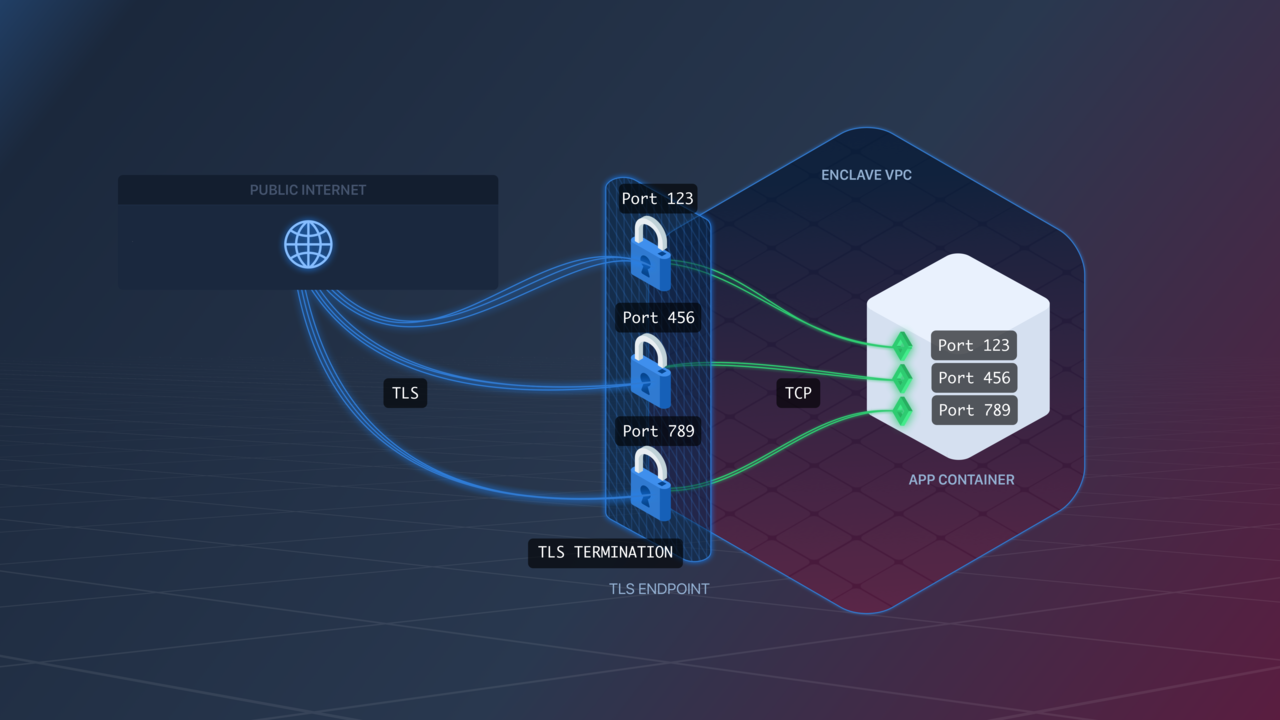
gRPC Endpoints are configured similarly to TLS Endpoints.The Endpoint will listen for encrypted gRPC traffic on exposed ports and transfer it as plain gRPC traffic to your app over the same port. For example, if your Image exposes port 123, the Endpoint will listen for gRPC traffic on port 123, and forward it as plain gRPC traffic to your app Containers on port 123.
gRPC endpoints provide Zero-Downtime Deployment by leveraging gRPC Health Checking.
Specifically, Aptible will use health/v1’s Health.Check call against your service, passing in an empty service name, and will only continue with the deploy if your application responds SERVING.
When implementing the health service, please ensure you register your service with a blank name, as this is what Aptible looks for.
gRPC Endpoints enforce an idle timeout on connections. By default, the inactivity timeout is 60 seconds. You can configure a different timeout per endpoint:
In Terraform, set idle_timeout on the aptible_endpoint resource (see Endpoint Settings).
Migrating from environment variables:IDLE_TIMEOUT was previously set as an app configuration variable. Once your endpoints are configured, unset it from your app using aptible config:unset.
This setting lets you customize the SSL ciphers used by your Endpoint.The format is a string accepted by Nginx for its ssl_ciphers directive.Pay very close attention to the required format, as a bad value will prevent the proxies from starting.
Enabling this setting causes your Endpoint to stop accepting traffic over the SSLv3 protocol or using the RC4 cipher.We strongly recommend enabling this on all gRPC Endpoints.
In Terraform, set ssl_protocols_override, ssl_ciphers_override, and disable_weak_cipher_suites on the aptible_endpoint resource (see Endpoint Settings).
Migrating from environment variables:SSL_PROTOCOLS_OVERRIDE, SSL_CIPHERS_OVERRIDE, and DISABLE_WEAK_CIPHER_SUITES were previously set as app configuration variables. Once your endpoints are configured, unset them from your app using aptible config:unset
Was this page helpful?
Assistant
Responses are generated using AI and may contain mistakes.