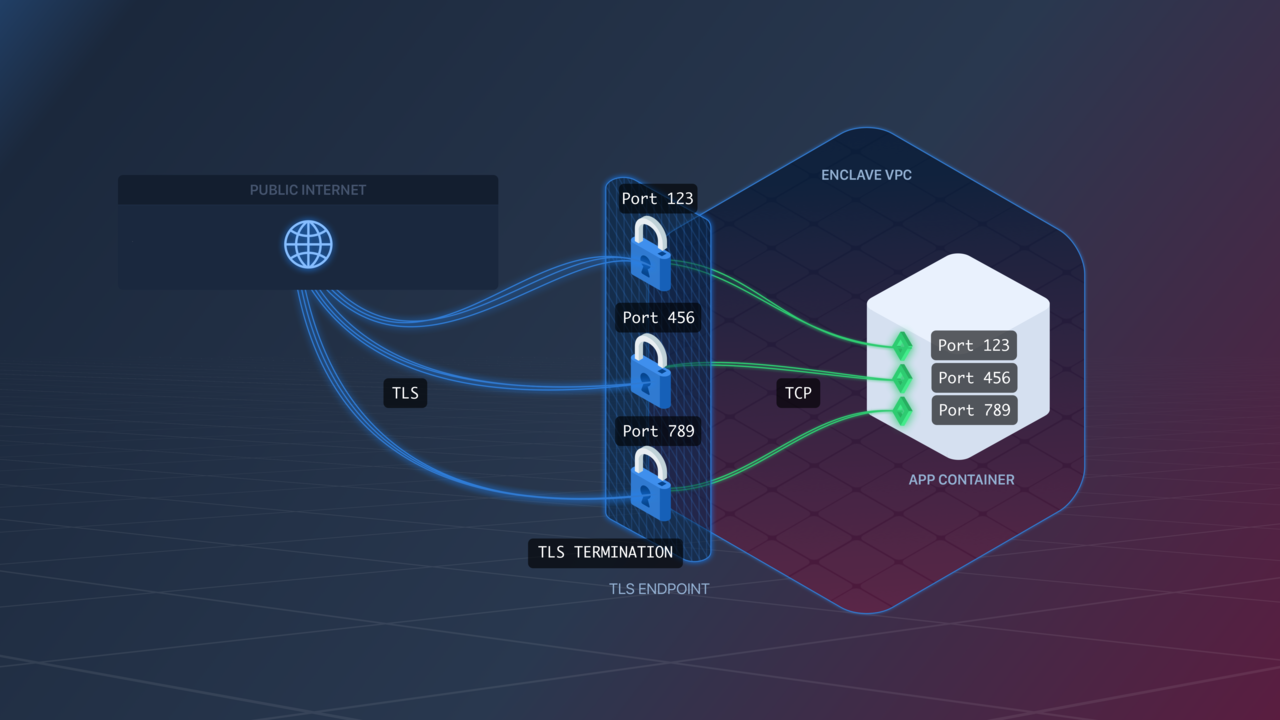
TLS Endpoints are configured similarly to TCP Endpoints.The Endpoint will listen for TLS traffic on exposed ports and transfer it as TCP traffic to your app over the same port. For example, if your Image exposes port 123, the Endpoint will listen for TLS traffic on port 123, and forward it as TCP traffic to your app Containers on port 123.
Unlike HTTP(S) Endpoints, TLS Endpoints currently do not provide Zero-Downtime Deployment. If you require Zero-Downtime Deployments for a TLS app, you’d need to architect it yourself, e.g. at the DNS level.
TLS Endpoints enforce an idle timeout on connections. By default, the inactivity timeout is 60 seconds. You can configure a different timeout per endpoint:
In Terraform, set idle_timeout on the aptible_endpoint resource (see Endpoint Settings).
Migrating from environment variables:IDLE_TIMEOUT was previously set as an app configuration variable. Once your endpoints are configured, unset it from your app using aptible config:unset
This setting lets you customize the SSL ciphers used by your Endpoint.The format is a string accepted by Nginx for its ssl_ciphers directive.Pay very close attention to the required format, as a bad value will prevent the proxies from starting.
Enabling this setting causes your Endpoint to stop accepting traffic over the SSLv3 protocol or using the RC4 cipher.We strongly recommend enabling this on all TLS Endpoints.
In Terraform, set ssl_protocols_override, ssl_ciphers_override, and disable_weak_cipher_suites on the aptible_endpoint resource (see Endpoint Settings).
Migrating from environment variables:SSL_PROTOCOLS_OVERRIDE, SSL_CIPHERS_OVERRIDE, and DISABLE_WEAK_CIPHER_SUITES were previously set as app configuration variables. Once your endpoints are configured, unset them from your app using aptible config:unset
Was this page helpful?
Assistant
Responses are generated using AI and may contain mistakes.